 Relio ERD
PostgreSQL DDL guide
Export an ERD to PostgreSQL SQL
Design columns, primary keys, and relationships for users and posts tables in Relio ERD. Review the generated PostgreSQL DDL and download it as a .sql file.
Follow along with users and posts
Step 1
Add users and posts tables
In a new ERD, select Add table twice and name the tables users and posts. Select a table name on the canvas to rename it.
Step 2
Add columns and set a primary key
Select a table, then choose Add column in the Columns tab of its details panel to set a name and data type. In the Constraints tab, choose Add primary key, select id, and choose Apply. Primary key columns are set to NOT NULL automatically. Clear Allow NULL for any other column that should be NOT NULL.
Example columns for users and posts Table Column Type Key · NULL users id INTEGER PK · NOT NULL users email TEXT NOT NULL posts id INTEGER PK · NOT NULL posts user_id INTEGER NOT NULL posts title TEXT NOT NULL 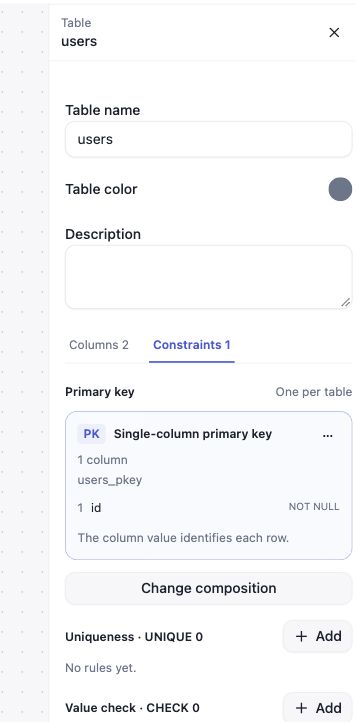
Primary key and NOT NULL settings for users.idView the table details screenshot at full size Step 3
Connect posts.user_id to users.id
Choose Connect relationship beside posts.user_id. Set posts.user_id as the foreign key, users.id as the referenced key, then choose Create relationship.
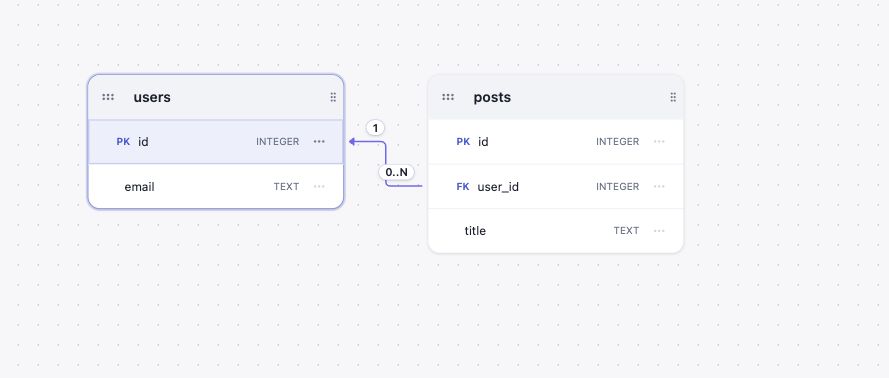
Example relationship from posts.user_id to users.idView the ERD canvas screenshot at full size Step 4
Preview PostgreSQL DDL and check the result
From the File menu, choose View PostgreSQL DDL… Check that the generation result has no errors. The output targets PostgreSQL 17 and uses the public schema.
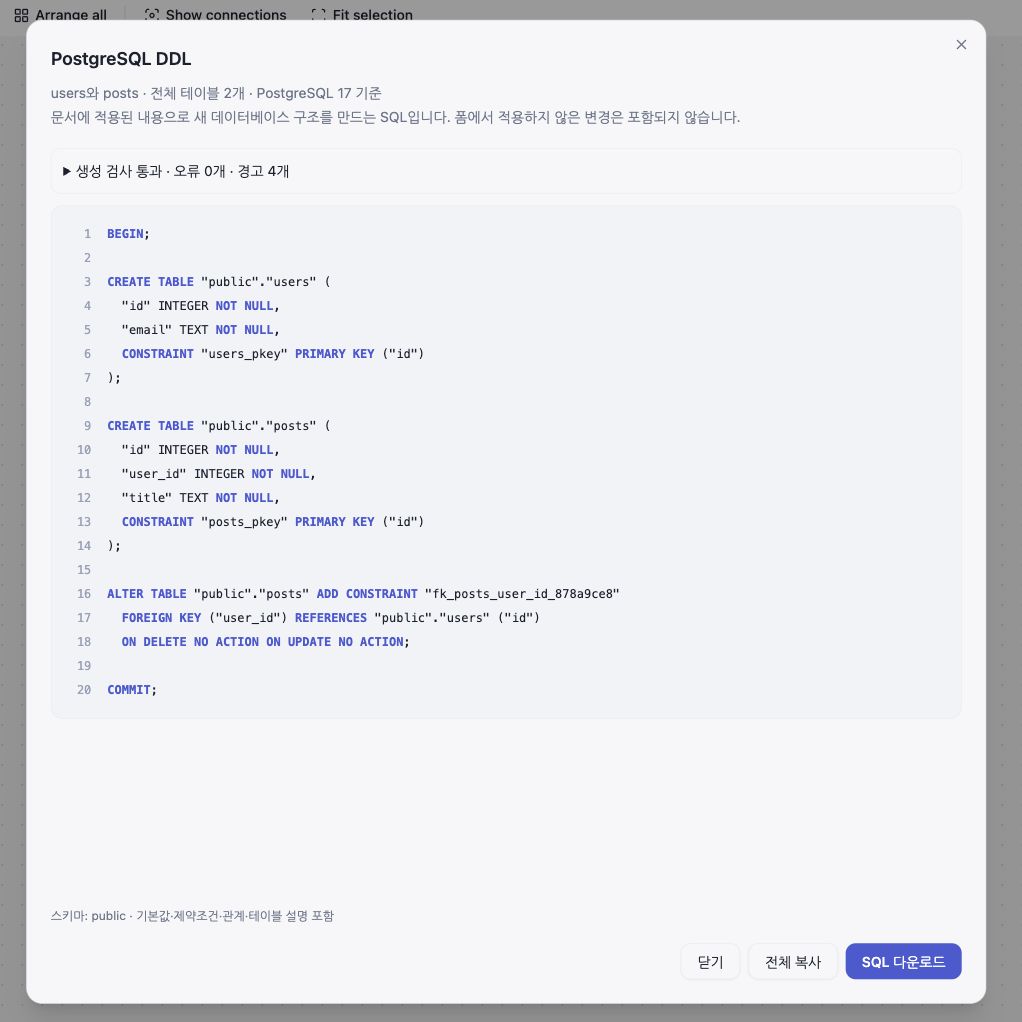
Preview of the generated PostgreSQL DDLView the DDL preview screenshot at full size Step 5
Choose SQL download
Select SQL 다운로드 below the preview to save a .sql file generated from the current document. Relio ERD does not run the SQL against a database, and the CREATE TABLE output is not a migration for updating an existing database.
Optional: use PostgreSQL data types
In Model settings from the File menu, set the target database to PostgreSQL to use its data type list and recommended type checks. You can still preview PostgreSQL DDL without changing this setting.
Example generated SQL
The preview reflects changes applied to the document. Edits that have not been applied are not included.
BEGIN;

CREATE TABLE "public"."users" (
  "id" INTEGER NOT NULL,
  "email" TEXT NOT NULL,
  CONSTRAINT "users_pkey" PRIMARY KEY ("id")
);

CREATE TABLE "public"."posts" (
  "id" INTEGER NOT NULL,
  "user_id" INTEGER NOT NULL,
  "title" TEXT NOT NULL,
  CONSTRAINT "posts_pkey" PRIMARY KEY ("id"),
  CONSTRAINT "fk_posts_user_id_878a9ce8"
    FOREIGN KEY ("user_id") REFERENCES "public"."users" ("id")
    ON DELETE NO ACTION ON UPDATE NO ACTION
);

COMMIT;
Example files
These files were generated from the users and posts example in this guide.